Basic Intake
What to take. When to take it.
Track every pill, vitamin, and medication you take, for free. Check off a dose in one tap, keep your streak, and log it from your wrist. The AI advisor is optional, and it asks first.

Tap a dose on either one.
Every dose, in its place.
Morning, afternoon, and evening each get their own list. Tap a dose when you take it. Take all logs the rest of a time of day at once, with Undo if you tapped too soon.
Schedule a supplement for every day or only certain days. Anything not due today stays out of sight, so an off day never breaks your streak.
Tap a dose, or Take all in the Afternoon card.
Scan the bottle. The rest fills in.
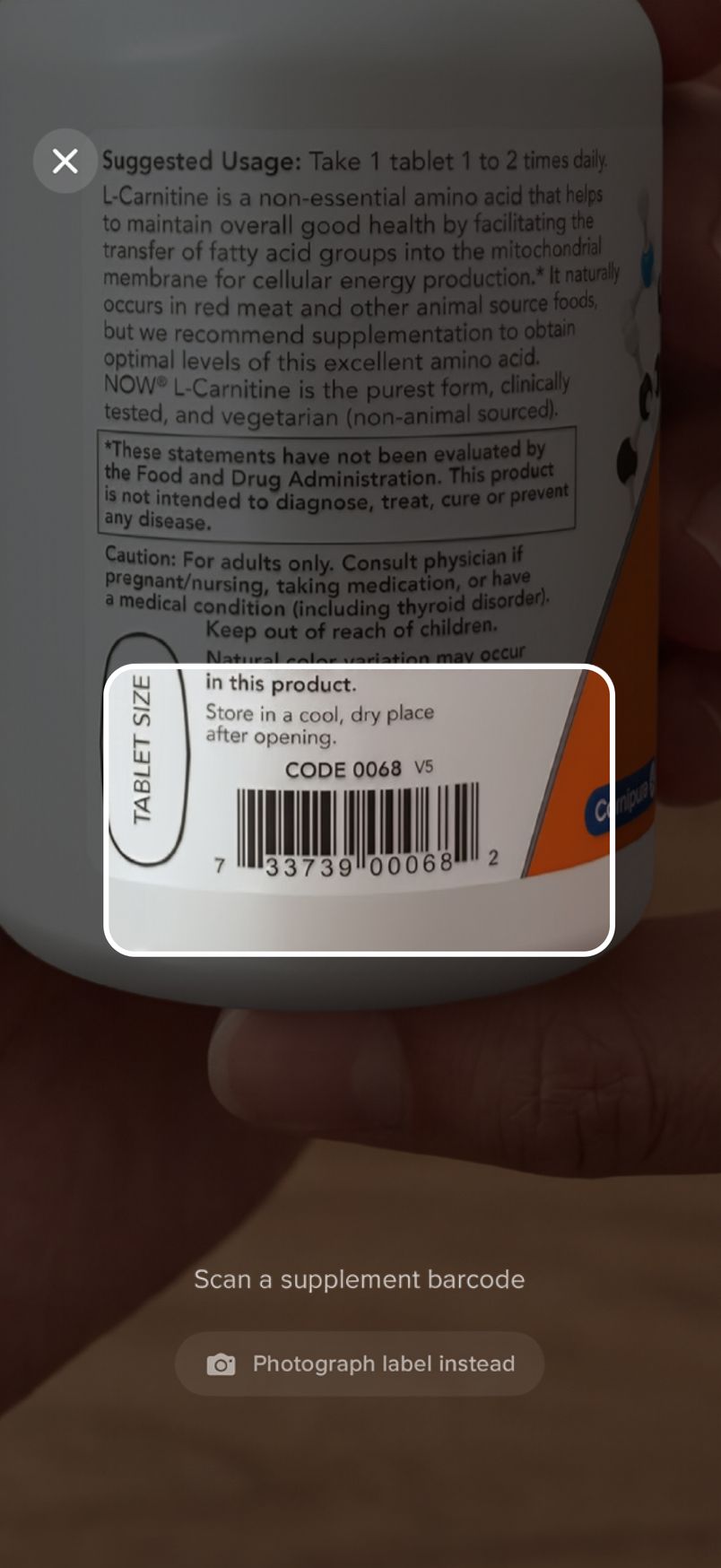
Point your camera at the barcode and the name and dose fill in. If it isn’t recognized, photograph the Supplement Facts panel and the AI reads it.
Barcode scans are always free. Label photos are part of Pro.
Ask about your stack.
The advisor knows what you take and when. Ask it anything, or tell it what changed and it updates your list, then says exactly what it did. When two supplements share a name, it asks which one first.
Review My Stack ranks every item Keep, Adjust, or Drop, with a plain reason and a confidence level. If you’ve been missing doses, it tells you to take it consistently first.
Clinical calls go to your doctor.
Magnesium glycinate is gentle, but I'd consider moving the morning dose to the evening alongside your existing 200 mg. It supports sleep quality, and splitting it across the day isn't necessary at this dose.
Most of your stack is earning its place. Two doses could use a change, and one item has no clear reason to stay.
Every nutrient, added up.
Nutrient Totals adds up every vitamin and mineral in your stack against the RDA, and flags anything past its upper limit.
Import a lab report PDF and your advisor pulls out your biomarkers, like vitamin D, B12, ferritin, and cholesterol, and tracks each one against its reference range.Pro
This is the combined amount of each nutrient in your daily stack, compared against the Recommended Daily Allowance (RDA).
You're taking about 8.3× the RDA — well above the standard recommendation. Supports bone health, immune function, and mood. Many people are deficient. Your total exceeds the tolerable upper limit of 4,000 IU. Consider lowering your dose or checking with your doctor.
You're hitting a healthy 142% of the 420 mg RDA — right in the target range. Supports muscle function, sleep quality, and over 300 biochemical reactions. Your total exceeds the tolerable upper limit of 350 mg. Consider lowering your dose or checking with your doctor.
You're at 136% of the RDA, a healthy amount for immune support and skin.
You're at about a third of the RDA from supplements.
How you feel, next to what you take.
Rate your mood and energy with a tap each. Turn on weight tracking and your weekly trend shows green toward your goal, amber away from it.
Once a month Intake asks whether something is helping. With Pro, Review My Stack weighs all of it.
Tap Mood, Energy, or Weight, then a number.
For the people you look after.
Track a parent’s medications, a kid’s vitamins, and the dog’s joint chew alongside your own. Each person or pet gets their own schedule, reminders, and history.
One tap turns anyone’s list into a PDF to hand their doctor.
Tap a dose to mark it given.
Log it from your wrist.
On Apple Watch, the doses due now come up one at a time. Tap Mark taken and your iPhone knows. On your Home Screen, the widget checks doses off without opening the app.
Tap Mark taken, or a dose in the widget.
Your records stay yours.
Your stack, doses, and check-ins live on your devices and in your own iCloud. There’s no account to make, no tracking, and no ads.
The AI features are off until you say yes, and Intake shows exactly what it would send first. Choose Not Now and tracking, reminders, check-ins, and reports keep working.
Basic Intake is an informational tool, not medical advice. Talk with your doctor before starting or changing any supplement.
Tracking is free.
Doses, schedules, reminders, streaks, check-ins, caregiver mode, and reports cost nothing. Pro adds the AI advisor and the checks that run on it.
Free
No trial clock on tracking.
- Every supplement and medication you take, with reminders
- Barcode scanning, always unlimited
- Streaks, check-ins, and weight tracking
- Caregiver mode for people and pets
- Provider reports as a PDF
- Apple Watch, widgets, and Apple Health
- iCloud sync, backup, and restore
Pro
Your first week includes Pro, with up to 15 AI chats and 15 label photo scans.
- The AI advisor, which knows your stack and your Apple Health data
- Review My Stack: keep, adjust, or drop
- Label photos read by AI
- Blood work import from a lab report PDF
- Interaction and nutrient checks each time you add a supplement
- Custom Home Screen app icons
Prices in US dollars. Subscriptions renew until you cancel in Settings.
The rest of the routine.
Your routine
- Every day or certain days, like vitamin D on weekends
- Skip a dose on purpose with a long press
- Fill in a dose you forgot to log, up to a week back
- Restock reminders before a bottle runs out
- Morning, afternoon, and evening reminders that come through Focus
Health and reports
- Doses send the vitamins and minerals Apple Health tracks
- Weigh-ins go to Apple Health
- Sleep and activity feed the advice
- A doctor-ready PDF of everything you take, for you and anyone you care for
Streaks
- One missed day is forgiven, and the streak freezes instead of breaking
- New flames at 60, 90, 120, 150, 180, 240, and 300 days
- At a year, pick any flame to keep
Everywhere
- Apple Watch app
- Widgets for the Home Screen and Lock Screen
- Full VoiceOver support
- Six app icons, five of them with Pro
- 01
Lost or gained so far
Your weight card shows how much you’ve lost or gained so far, right under your goal and next to what’s left to go.
- 02
Only today’s Health reading
The Apple Health suggestion on your weight check-in only offers a reading taken today by your scale or another app, so yesterday’s number can’t slip in as today’s.
- 03
Weight details match your card
The weight details screen always shows the same current weight as your card.
- 04
Weekly recaps without mood
With mood tracking off, your weekly recap leaves out mood and energy too.

Basic Checkbook
A modern checkbook register that brings clarity to your finances.

Ink.
Editorial paper-themed notes, written by voice. iCloud sync across iPhone, iPad, and Mac.

Drift
60-second micro-decompression, breathe, touch, listen, reset.

Basic Bins
The inventory you will actually keep. Photograph what goes in the box, label it, and see inside without lifting the lid.

Basic Fidgit
Fifty-six tactile screen fidgets with real haptics and sound.

Basic Deck
A frosted grid of tiles pinned to your Mac desktop. Launch anything in one click.